Customer page
Everything about their car, on their phone, without an app.
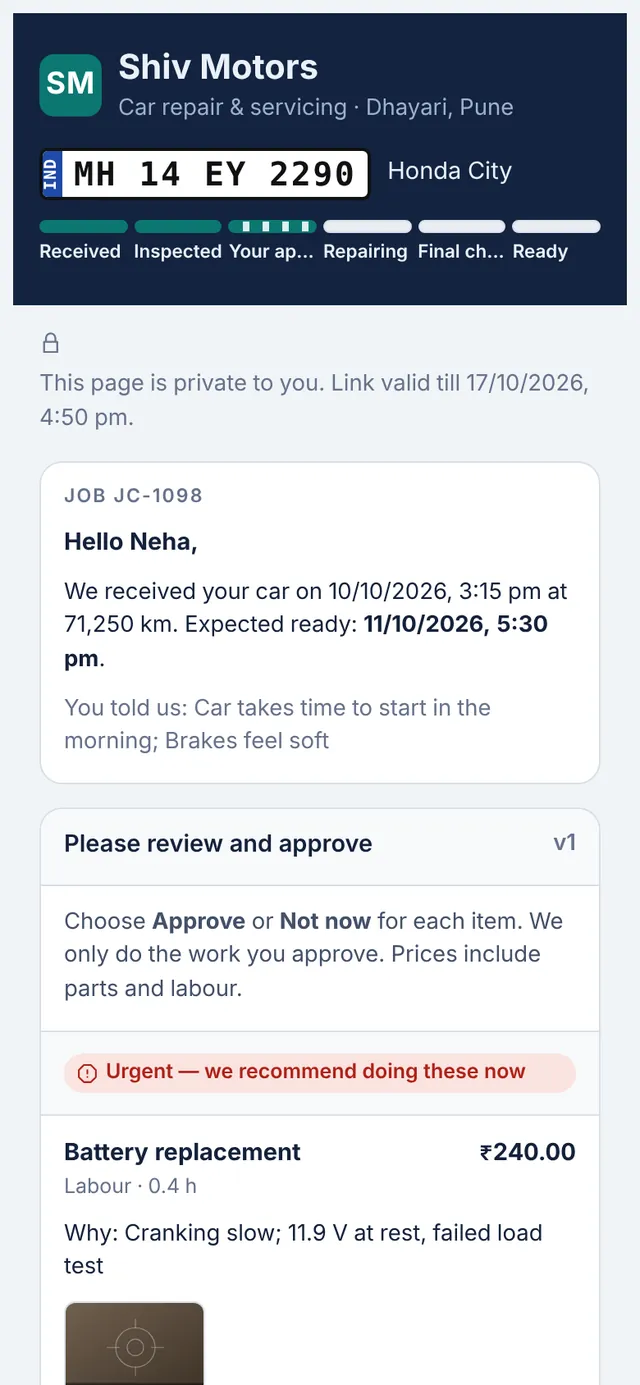
Every job gets a private link for the customer. It shows a progress tracker from received to ready, the complaints you recorded, the estimate to approve with inspection photos, the invoice with a PDF download, and a way to pay: a UPI QR code from your UPI ID, or online payment into your own Razorpay account on the Pro plan.
Included in every plan, from Starter up.
What you can do
Progress tracker
Received, inspected, approval, repairing, final check and ready.
Approve with photos
Inspection photos sit next to each estimate item.
Invoice and PDF
The customer can view and download the invoice.
Pay by UPI
A UPI QR code for the balance, generated from your UPI ID.
Pay online (Pro)
Card, UPI or net banking through your Razorpay account, marked paid automatically when verified.
Private and expiring
A random link that expires and can be switched off by the garage.
How it works
- The link is created when you share an estimate or invoice.
- The customer opens it from WhatsApp.
- They approve, follow progress and pay.
- Every view and decision is recorded on the job.
Good to know
Does the customer need to sign up?
No. The link is private to them; there is no account or app.
Can someone else open the link?
Anyone with the link can open it, like any private link, so it is only shared with the customer. It expires and you can switch it off.
Does it show my prices to other garages?
No. A link only shows that one customer’s job.
Try customer page in your garage
Free for 14 days with every feature. Setup takes about ten minutes: add your mechanics, then check in a car.